

A TON wallet is an app that holds the keys to your coins on The Open Network. The main choice is custody: self-custodial wallets such as Keeper (formerly Tonkeeper), My Wallet (formerly MyTonWallet) and Tonhub give you the recovery phrase, while Walt in Telegram holds the keys for you. Telegram also has its own built-in wallet, Telegram Money.
Several TON wallets changed their names in 2026, and the coin itself is now called Gram (GRAM). This guide uses the current names, with the old ones in brackets, and every detail comes from the wallets’ own sites and TON’s documentation.
Key takeaways
- Pick self-custodial if you want to be the only one who can move your coins.
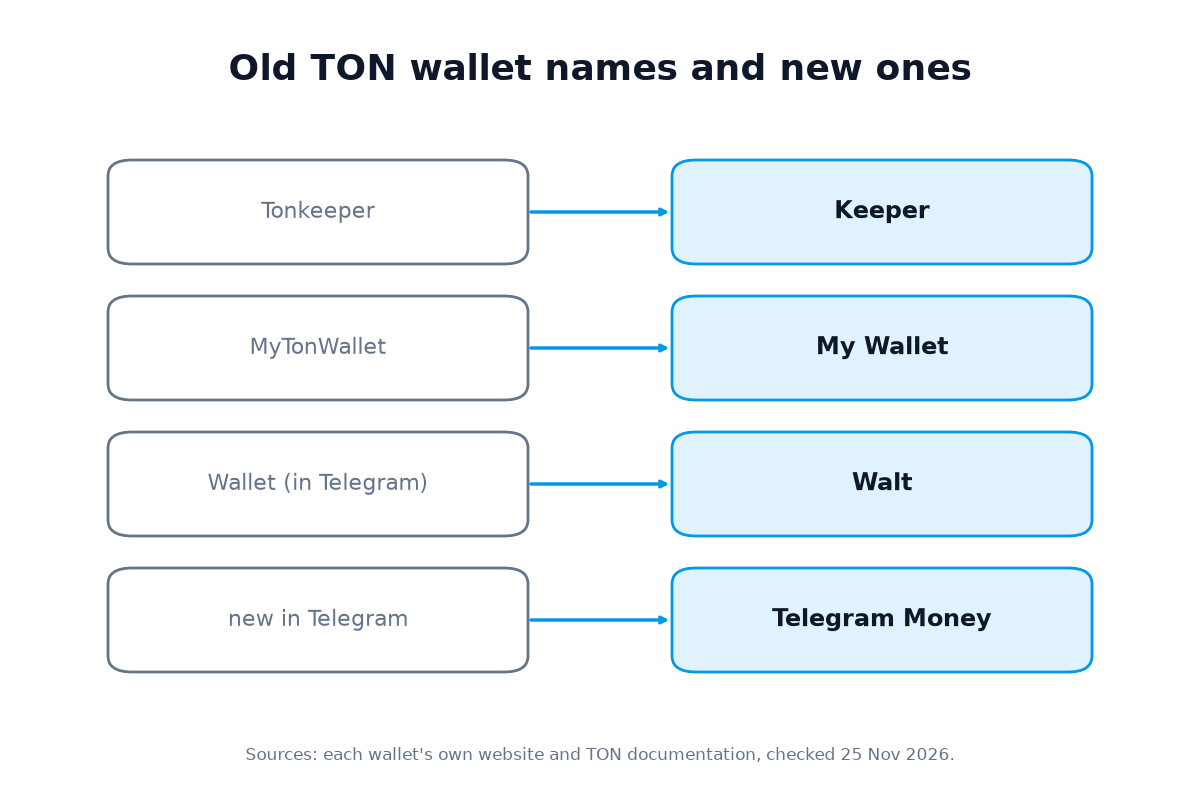
- Tonkeeper is now Keeper, MyTonWallet is now My Wallet, and Wallet in Telegram is now Walt.
- Telegram Money is the native wallet in TON’s documentation, with TON Connect for Mini Apps.
- Your recovery words are the wallet. Keep them offline and never type them into a site.
Which TON wallets are there in 2026?
The main TON wallets in 2026 are Keeper, My Wallet, Tonhub, Walt, Telegram Money and the official wallet.ton.org web app. They differ on custody, devices and whether they cover other blockchains too.
| Wallet | Formerly | Custody | Where it runs | Notes from its own site |
|---|---|---|---|---|
| Keeper | Tonkeeper | Self-custodial | iOS, Android, macOS, web, browser extension | Buy, swap and stake; card and other on-ramps |
| My Wallet | MyTonWallet | Self-custodial | Mobile, desktop, Chrome, Firefox and Edge extensions | TON plus Bitcoin, Ethereum, Solana and 15 more networks; Ledger support |
| Tonhub | Non-custodial | iOS, Android | TON Connect built in; staking; card | |
| Walt | Wallet (in Telegram) | Custodial | Telegram, Android; iOS later | Buy with a card; sending USDT on TON costs 1 USDT |
| Telegram Money | Recovery phrase plus cloud backup | Inside Telegram | Five free transfers a day; TON Connect | |
| wallet.ton.org | Self-custodial | Web browser, no install | Official TON web wallet; Wallet v5 contract |
What is the difference between custodial and self-custodial TON wallets?
A self-custodial TON wallet gives you the recovery phrase, so only you can move the coins. A custodial wallet keeps the keys on the service’s side, which makes recovery easier but means you trust that company with your funds. Walt describes its protection as institutional-grade custody with a passcode and two-factor authentication, while Keeper says its keys stay on your device.
Telegram Money sits in between. TON’s documentation says its encrypted cloud backup splits the wallet key into three parts stored in data centres on three continents, and its recovery phrase also lets you import the wallet into another compatible app.
How does Telegram Money work?
Telegram Money is the wallet built into the Telegram app. TON’s documentation describes it as a mainnet wallet on The Open Network for receiving assets and connecting to decentralized apps through TON Connect. Telegram covers the network fee on a daily allowance of five free transfers, so small everyday payments cost nothing.
On Telegram Desktop you open it from the main menu by choosing Money. The docs note that the entry appears only when Telegram enables wallet access for the account, so not every user sees it yet. Backups live under Keys and Backup, where you can also restore the wallet from its recovery phrase.
What is TON Connect, and why does your wallet need it?
TON Connect is the standard protocol that links a TON wallet to apps and websites. When a Mini App or dApp wants a payment or a signature, it sends a request through TON Connect, and your wallet shows what is being asked before you approve. Tonhub’s site says it shows what each request is asking for before you sign. A wallet without TON Connect can still send and receive GRAM, but it cannot log in to most TON apps. Our Telegram Mini Apps guide explains how those apps use it, and the TON Connect documentation covers the technical side.
How do I set up a TON wallet safely?
- Download the wallet only from its own website or the official app store link on that site.
- Create a new wallet and write the recovery words on paper. TON’s docs for wallet.ton.org ask you to save 24 words.
- Store the words offline. The docs warn that anyone with the mnemonic can take control of the wallet.
- Send a small test amount first and check the network before sending more. The docs warn to verify which network is used before funds are sent.
- Connect to Mini Apps and dApps only through TON Connect prompts you understand.
What mistakes do people make with TON wallets?
- Storing the recovery words in a photo or notes app. TON’s docs advise against keeping them digitally.
- Sending on the wrong network. An exchange withdrawal must use the TON network, or the coins may not arrive.
- Installing a lookalike app. Several wallets changed names in 2026, which makes fake listings easier to miss. Follow the link from the wallet’s own site.
- Approving requests you have not read. A TON Connect request can move funds once you sign it.
Which TON wallet should you use?
- Phone first, TON only or mostly: Keeper or Tonhub, both self-custodial.
- Several blockchains in one app: My Wallet, which lists TON alongside Bitcoin, Ethereum and Solana.
- Everything inside Telegram: Telegram Money, or Walt if you prefer a custodial service.
- No install: the official wallet.ton.org web app.
Once your wallet is ready, our guide on how to buy Toncoin covers funding it, and TON staking explains how to earn on the balance. New to the coin? Start with what Toncoin is and why it is now called Gram.
Frequently asked questions
What is the best TON wallet?
It depends on custody. If you want to hold your own keys, self-custodial apps such as Keeper, My Wallet, Tonhub or the wallet.ton.org web wallet fit. If you want a service to hold them, Walt inside Telegram is custodial.
What happened to Tonkeeper?
Tonkeeper is now called Keeper. Its website describes it as one wallet for every network, formerly Tonkeeper, and it still runs as a self-custodial wallet.
Is the wallet in Telegram safe?
There are two. Walt, formerly Wallet, says your crypto is held with institutional-grade custody, so the service holds the keys. Telegram Money, the native wallet in TON’s docs, gives you a recovery phrase plus an encrypted cloud backup.
How many recovery words does a TON wallet use?
TON’s documentation for wallet.ton.org says to save 24 words of the mnemonic. Anyone with those words can take control of the wallet, so keep them offline.
Can I use a TON wallet with Telegram Mini Apps?
Yes. Mini Apps connect to TON wallets through TON Connect. Telegram Money, Tonhub and Walt all mention TON Connect support on their own pages.
Sources: TON docs, Telegram Money, TON docs, wallet.ton.org, and each wallet’s own website linked in the table. Checked 25 November 2026.